
Housemark
Scan an appliance's rating label, get the maintenance it needs, and keep every shut-off and paint color in one place.
Beta: iPhone and iPad through TestFlight, 100 places
Free for one home. Housemark Pro adds unlimited homes and Home Passport exports: a one-time $14.99 unlock, no subscription.
- Job
- Home maintenance records
- You give it
- A photo of an appliance's rating label
- You get
- Its brand, model and serial, and a reminder when each maintenance task is due
- Runs on
- Google Play · iPhone & iPad beta
- Account
- None needed
Overview
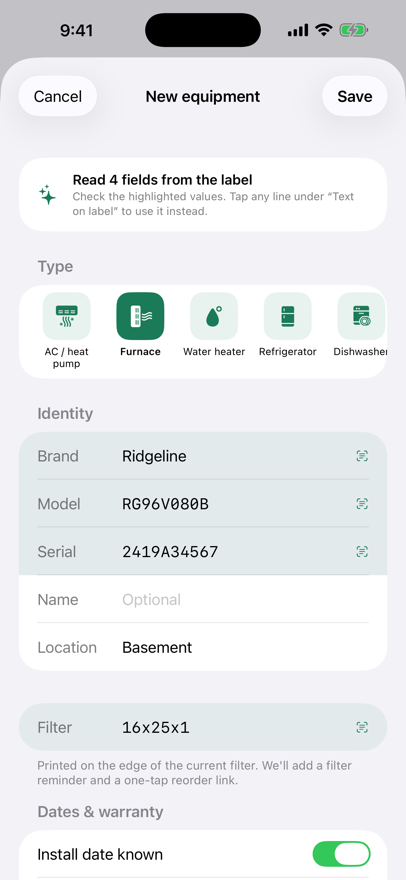
Photograph the rating label on a furnace, water heater or refrigerator and Housemark reads the brand, model, serial number and filter size on the phone, then adds the upkeep that equipment needs (filter changes, water heater flushes, dryer vent cleaning), with a reminder when each is due.
Record where the water, gas and electrical shut-offs are, log paint colors by room, and when you sell, export a Home Passport the next owner imports on day one.
No account and no server of ours: records stay on your phone. The iPhone and iPad version, now in a TestFlight beta, also syncs through your own private iCloud.
Features
- Scan a rating label
- On-device text recognition fills in the brand, model, serial and filter size. Tap any line from the label to fix a misread.
- Reminders that roll forward
- Winterize outdoor faucets, change the furnace filter, test smoke alarms. Mark a task done and its next due date moves ahead on its own.
- Hand over the whole house
- Export a PDF for buyers and agents, plus a transfer file the next owner imports into Housemark: equipment, warranties, service history and shut-offs.
See it work
Watch on YouTube how it works, in 90 seconds
Screenshots
What it does
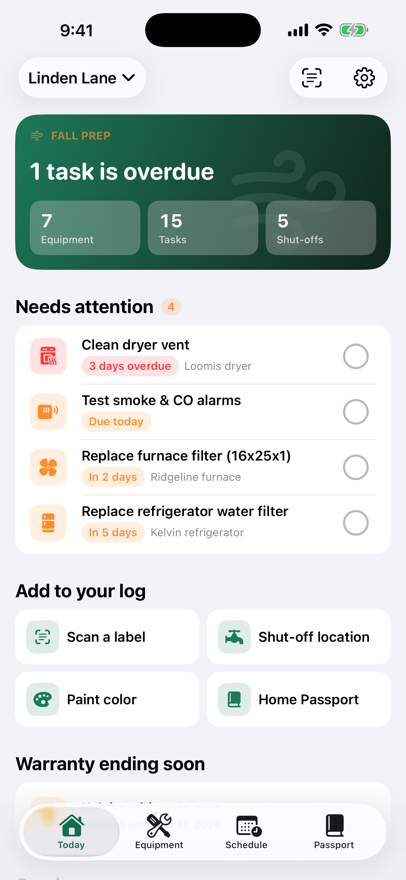
- Name your home and pick the seasonal tasks you want reminders for, such as cleaning gutters or testing smoke alarms.
- Photograph an appliance's rating label. Housemark reads it on your device and fills in the brand, model, serial number and, for furnaces and air conditioners, the filter size. You check each field before saving.
- Saving the appliance adds the maintenance it needs, like filter changes or water heater flushes. Mark a task done and its next due date moves forward. Log a note or a cost to build a service history.
- In the Passport tab, record where the shut-offs are, with photos and directions, and the paint colors in each room.
Who it's for
Homeowners who want one record of their appliances, filter sizes, shut-offs and paint, and people who look after more than one home. When you sell, you can hand the record to the buyer as a Home Passport. Listing agents can suggest one to their sellers, and property managers can keep one record per home they look after.
Questions
What if the scan misreads the label?
Every field it read is highlighted. Tap the right line under Text on label, or type the value in. Older stamped plates read less reliably than printed ones.
Where do the manual and parts links go?
To a web search for your exact model's manual, or for parts at a retailer. Shopping links may earn Meyer App Studio a commission at no extra cost to you.
What's free?
Everything for one home: label scanning, equipment, reminders, shut-offs, paint and manual links. Housemark Pro is a one-time purchase that adds unlimited homes and Home Passport export.
What is a Home Passport?
A PDF for buyers, agents or inspectors, plus a transfer file that recreates the whole home in Housemark on the next owner's phone. Importing one is free, and transfer files open on both Android and iPhone.