Tallycraft
Cut lists for sheet goods and lumber, laid out and walked through at the saw.
Beta: through TestFlight, 50 places
- Job
- Cut lists for sheet goods and lumber
- You give it
- The parts you need and the stock you have
- You get
- Sheet and board layouts that allow for kerf, trim and grain, then each cut in order at the saw
- Runs on
- Google Play · iPhone & iPad beta
- Account
- None needed
Overview
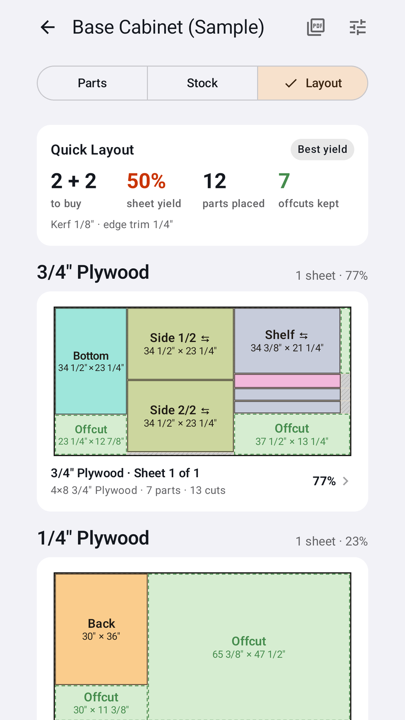
Add the parts you need and the stock you're cutting from, and Tallycraft lays out every sheet and board allowing for your blade's kerf, edge trim and grain, and tells you how many sheets and boards to buy.
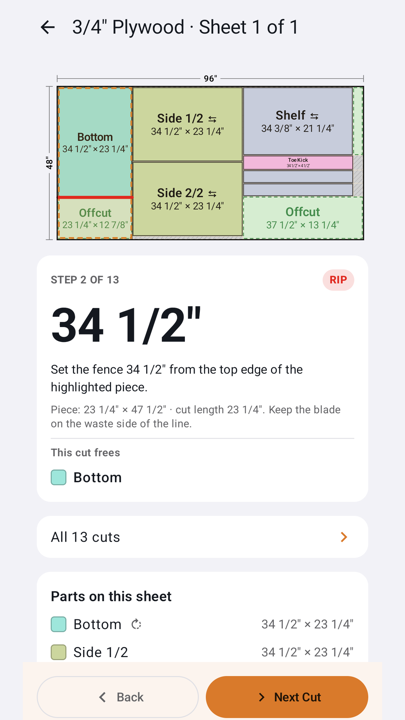
At the saw it steps through the cuts one at a time, with the fence number shown large. Mark a project as cut and the usable offcuts are saved for the next project in the same material.
Layouts and step-by-step cuts are free; Tallycraft Pro is a one-time purchase that adds Deep Optimize, plan scanning and file import, PDF blueprints and cost estimates. No account and no subscription. Always check measurements before you cut.
Features
- Step-by-step cuts
- One cut per screen: rip or crosscut, the fence or mark number, and which part the cut frees. The screen stays awake while you work.
- Offcuts carry over
- Mark as Cut saves leftovers above your size thresholds, and the next project in that material uses them first.
- Nothing goes missing quietly
- A part that doesn't fit is listed with the reason: too large, grain conflict, no matching material, or out of stock.
- Paste a cut list
- Paste a list from any plan for free. With Pro, scan a printed plan or import a photo, PDF or CSV.
Screenshots
What it does
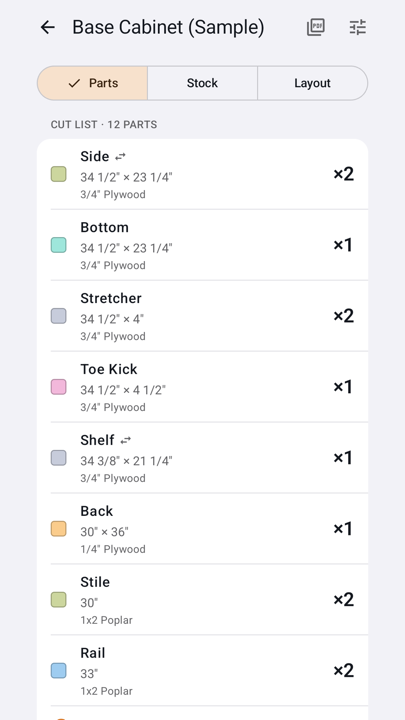
- Add the parts you need and the stock you're cutting from, such as a 4×8 sheet of plywood or 8′ boards. Sizes can be fractions, feet and inches, or millimeters.
- Set your blade kerf and edge trim. Tallycraft lays out every sheet and board as you type, keeping the grain direction on parts where you've locked it.
- Open a sheet to step through the cuts one at a time: rip or crosscut, and the fence setting for each.
- Mark the project as cut, and leftovers above your size threshold go into the offcut inventory, ready for the next project in the same material.
Who it's for
Hobby and small-shop woodworkers building cabinets, bookcases, drawer boxes and workbenches from plywood, MDF and dimensional lumber, in inches or millimeters.
Questions
Can I bring in a cut list from a plan?
Yes. Pasting a cut list is free. With Tallycraft Pro you can also scan a printed plan, pick a screenshot, or open a PDF or CSV. Review the parts it found and fix any misreads before you create the project.
What's free?
Layouts, cutting diagrams, step-by-step cuts, offcut tracking, pasting cut lists and every sample project at its standard size. Tallycraft Pro is a one-time purchase that adds plan scanning and file import, custom-size sample builders, Deep Optimize, PDF workshop blueprints and project cost estimates.
Where are my projects kept?
On your device. Tallycraft has no account and no server of ours. Export a PDF blueprint to keep a copy of a project's plan.
Does it check my measurements?
No. Tallycraft plans the cuts. Check measurements before cutting, and follow your tool's safety instructions.